
How Can Businesses Reduce Mobile Device Deployment Costs?
Organizations can successfully reduce mobile device deployment costs by up to 40% through three core pillars: 1. Sourcing high-quality, pre-owned or certified refurbished carrier-unlocked hardware instead of brand-new retail units; 2. Automating device configuration using cloud-based Mobile Device Management (MDM) enrollment frameworks like Apple Business Manager and Android Zero-Touch; and 3. Outsourcing fulfillment, staging, and kitting to a direct wholesale partner. This comprehensive approach eliminates manual labor and leverages volume discounts to lower the Total Cost of Ownership (TCO).
We break down how this works for 3PL operations in a separate guide.
For modern enterprises, healthcare providers, logistics operations, and scaling small businesses, deploying a mobile fleet is a major capital and operational expense. Whether you are equipping field service technicians, setting up mobile point-of-sale (mPOS) systems for retail staff, or provisioning secure smartphones for a remote corporate sales force, the expenses scale rapidly. Unfortunately, many organizations make the mistake of looking only at the sticker price of the smartphones, completely overlooking the hidden internal expenses associated with rolling them out.
In reality, the hidden administrative and operational overhead of a mobile rollout—often called the “deployment tax”—can easily exceed the upfront hardware cost. To combat these rising expenses, smart IT directors, procurement managers, and operations leaders are re-evaluating their strategies. This playbook breaks down exactly how to reduce mobile device deployment costs while maintaining strict corporate security, physical device durability, and high deployment speed.
Deconstructing the True Cost of Mobile Deployment
Before you can successfully optimize your budget, you must first map where your financial leaks are occurring. A complete mobile deployment budget is split into three highly distinct categories:
1. Capital Expenses (CapEx)
This is the upfront price of the physical hardware, protective accessories, and cellular SIM cards. Buying brand-new flagship devices directly from consumer retail channels or major carriers locks your business into top-tier retail pricing and restrictive, high-margin service contracts. These carrier locks prevent you from switching networks if a better deal or stronger regional network becomes available, which is why many organizations prefer working with MVNOs or independent hardware partners to maintain operational flexibility.
2. Operational Expenses (OpEx)
This covers the labor hours required to prepare the devices for employee use. Historically, internal IT staff had to manually unbox every single phone, insert physical SIM cards, apply protective cases and glass screen protectors, manually connect to local Wi-Fi networks, and download business-critical applications one by one. For a rollout of 500 devices, this manual configuration process can easily waste hundreds of hours of highly paid IT labor.
3. Logistical & Fulfillment Costs
Once a phone is physically prepared, it must be securely packaged and shipped to the end user. If you are managing a distributed or remote workforce, coordinating individual shipments, tracking lost packages, and managing return logistics for defective or upgraded units adds significant overhead. This is equally critical when sourcing specialized fleets, such as wholesale phones for insurance companies, where rapid replacement and streamlined distribution keep field operations moving smoothly. Understanding these overheads is the first step toward figuring out how to reduce mobile device deployment costs across a growing enterprise.
Traditional Deployment vs. Optimized Bulk Deployment
The matrix below outlines the cost and efficiency differences between a traditional manual mobile rollout and an optimized, B2B-centric deployment strategy.
| Deployment Phase | Traditional Manual Approach | Optimized B2B Strategy | Cost Impact / Savings |
|---|---|---|---|
| Hardware Sourcing | Buying brand-new devices at retail prices or signing multi-year carrier lock-in contracts. | Sourcing unlocked, certified refurbished or A-grade pre-owned inventory in bulk. | 20% – 40% CapEx reduction per unit. |
| Device Provisioning | IT staff manually unboxing, booting up, and configuring settings on every phone. | Zero-Touch Enrollment (ABM, Knox, Google) for automated out-of-the-box configuration. | Saves hours of manual labor per device. |
| Kitting & Logistics | In-house assembly of chargers, cases, SIMs, and instructions into separate boxes. | Outsourced, pre-packaged kitting performed directly by the wholesale distributor. | Eliminates in-house assembly delays and high shipping overhead. |
| Network Flexibility | Carrier-locked devices that limit your ability to switch service providers. | Factory-unlocked bulk hardware compatible with any cellular carrier network. | Enables leverage to negotiate better cellular data rates. |
4 Key Strategies to Optimize Your Deployment Budget
By shifting your procurement and IT workflows toward these four core strategies, you can scale your mobile operations without ballooning your budget.
1. Move from Retail to Unlocked Wholesale Hardware
The easiest way to lower deployment costs is to stop purchasing brand-new devices at retail prices. For most business applications—such as scanning barcodes, managing emails, using CRM apps, or field communication—the latest $1,000+ flagship phone is excessive.
Sourcing budget-friendly smartphones or certified refurbished models directly from a trusted B2B distributor lets you secure highly reliable devices for a fraction of the cost. For example, opting for A-grade pre-owned models of popular devices like the Samsung Galaxy A series or Apple iPhone SE can instantly save your business up to 40% on hardware costs. Furthermore, insisting on carrier-unlocked inventory ensures you are never trapped by carrier-specific network locks or long contracts.
2. Implement Automated MDM Enrollment
Manual device setup is a major drain on IT efficiency. Instead, leverage modern cloud enrollment frameworks alongside MDM-ready devices to automate the provisioning process. This is a critical technical lever for anyone trying to figure out how to reduce mobile device deployment costs:
- Apple Business Manager (ABM): Links purchased iPhones directly to your Mobile Device Management (MDM) platform, allowing for automatic setup over the air. You can learn more about configuring enterprise settings directly on the official Apple Business Manager Support page.
- Android Zero-Touch Enrollment: Enables bulk-purchased Android devices to automatically pull down security configurations and work profiles as soon as they are turned on. Review deployment details on the Android Enterprise Help Center.
- Samsung Knox Mobile Enrollment: Quickly provisions Samsung devices in bulk, ensuring mandatory MDM integration even after a hard factory reset.
By automating this setup, your IT department can configure thousands of devices in minutes rather than spending weeks handling them manually.
3. Outsource Packaging, Assembly, and Kitting
Receiving thousands of devices in bulk and then manually pairing them with chargers, rugged cases, screen protectors, and instruction sheets is incredibly labor-intensive.
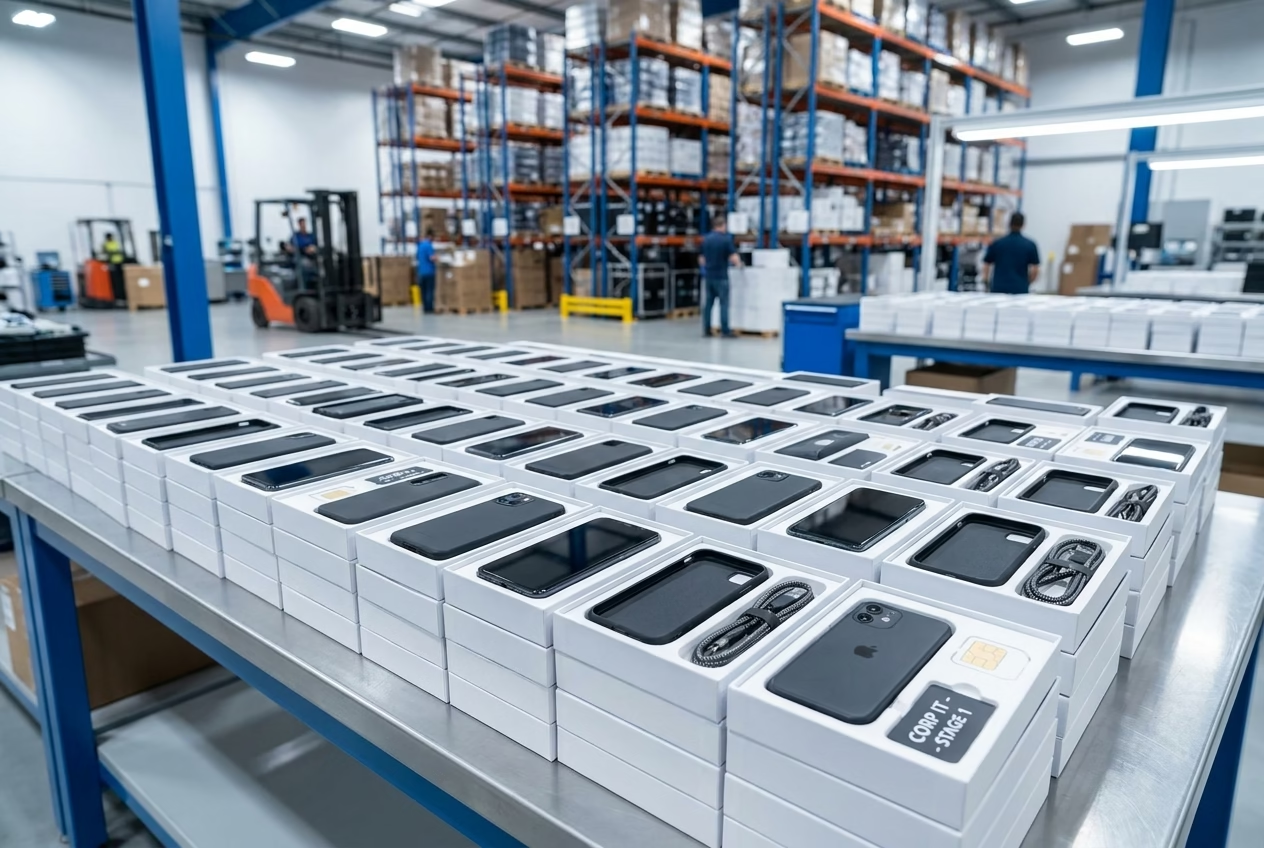
Outsourcing this step through mobile device kitting services allows your wholesale supplier to assemble these components in their warehouse. The supplier packages each device with its accessories, pre-installs SIM cards, and applies protective cases or screen protectors before shipping. Your team receives neat, ready-to-use packages that are ready for immediate distribution, cutting days off your deployment timeline.
4. Optimize Your Device Lifecycles
Not every department requires the same level of smartphone performance. To save money, match your device choices to specific employee roles:
- For Field Service & Logistics: Choose mid-range rugged devices like the Samsung Galaxy XCover series, which reduce replacement costs from drops and water damage.
- For Corporate Sales & Executives: Source reliable, pre-owned iPhones that offer great performance, security, and high resale value.
- For Frontline Retail or Non-Profits: Deploy highly cost-effective Android options like the Samsung Galaxy A14 or A15 to keep initial capital costs low.
Choosing the Right Deployment Partner
Successfully mastering how to reduce mobile device deployment costs relies heavily on partnering with a reliable, commercial-grade hardware distributor. Avoid gray-market liquidation sites or simple retail brokers who cannot guarantee inventory quality or consistency. When evaluating potential partners, ensure they meet these three criteria:
1. Direct Stock Ownership
Partnering with a supplier that physically stocks and tests their inventory prevents shipping delays and ensures consistent device quality.
2. Certified Diagnostic Testing
Ensure your supplier runs every device through comprehensive diagnostic software (like PhoneCheck) to verify battery health, camera functionality, and button response before shipping. This minimizes the risk of receiving dead-on-arrival (DOA) devices that disrupt your deployment schedule.
3. Comprehensive B2B Warranties
Avoid buying “as-is” inventory with no return options. Protect your budget by working with suppliers who offer clear return policies and extended hardware warranties.
A Step-by-Step Guide to Deploying Your Company Phones
Once you’ve sourced your bulk devices, follow these steps to set up a secure, standardized mobile deployment for your team:
- Choose Your MDM Platform: Select a system that supports both Android and iOS if you are managing a mixed fleet (e.g., Microsoft Intune, Miradore, or MobileIron).
- Link Your Accounts: Connect your MDM console to Apple Business Manager or your Android Zero-Touch portal.
- Create Configuration Profiles: Define your security policies, set up mandatory Wi-Fi networks, configure VPNs, and pre-select the work apps that will install automatically.
- Apply Custom Security Policies: Disable the ability to install unapproved personal apps, restrict screen recording if you handle sensitive data, and enforce strong, mandatory lock screen passcodes.
- Distribute Devices: Distribute the devices to your employees. As soon as they power on the phone and connect to the internet, your MDM settings will configure the device automatically.
Frequently Asked Questions
What is mobile device kitting, and how does it save money?
Mobile device kitting is the process of pre-assembling smartphones, cases, chargers, SIM cards, and quick-start guides into a single, deployment-ready package before shipping. By outsourcing this to a distributor, you save weeks of manual assembly labor for your internal IT staff.
Can we use Zero-Touch deployment with pre-owned devices?
Yes, you can. Pre-owned and certified refurbished devices can be registered to Apple Business Manager or Android Zero-Touch, provided you source them from an authorized business distributor who can link them to your enterprise account. Using this path is highly effective when exploring how to reduce mobile device deployment costs.
How much money can a business save by choosing refurbished instead of new phones?
Sourcing high-quality, certified refurbished or A-grade pre-owned devices typically reduces upfront hardware capital costs by 20% to 40% without sacrificing security or operational compatibility.
Why should we avoid carrier-locked phones for our corporate fleet?
Carrier-locked devices limit your ability to switch network providers and can lead to expensive cellular plans. Unlocked devices allow you to run on any network and negotiate better rates, which lowers long-term operational costs.
Conclusion: Simplify Your Mobile Deployments
Lowering your mobile deployment costs is about working smarter, not just spending less. By moving to unlocked wholesale hardware, utilizing automated MDM enrollment, and outsourcing staging and kitting, you can significantly reduce your IT workload and save your budget.
Ready to Optimize Your Next Mobile Deployment?
At Nobility Wireless, we help businesses, MVNOs, and IT departments streamline their mobile procurement. We offer fully tested, carrier-unlocked hardware, custom device kitting, and fast 48-hour fulfillment to keep your rollouts running smoothly.
Prefer to discuss your custom project? Call us directly at +1 305-745-7038 to speak with a mobile logistics expert.