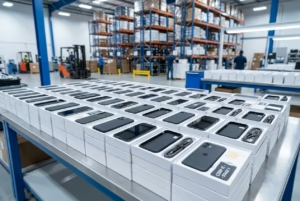


Most companies have a closet like this: boxes of retired phones and tablets from the last refresh, the one before that, and a few employees who left without anyone collecting their devices. Those phones still hold company data, and they lose resale value every month they sit there. Here’s how to turn that pile into cash or credit, without creating a security problem on the way out.

Are old company phones worth selling?
Usually, yes. Even a few generations back, business phones and tablets have resale value, and a fleet of 50 or 500 adds up quickly. What a buyer will pay depends on a handful of factors:
- Model and generation: newer flagships hold value best, but older models still sell, especially in volume.
- Storage capacity: higher-storage configurations are worth more.
- Condition grade: screen, housing, and battery health all affect the grade.
- Lock status: carrier-locked, Activation-Locked, or MDM-enrolled devices are worth far less, or can’t be processed at all, until they’re released.
- Quantity and mix: a single lot of the same model is easier to price and sell than a scattered mix.
Non-working devices aren’t automatically worthless either. Many buyers will still make an offer on cracked or dead units, just at a lower grade. The one thing that always costs you money is waiting: every new release pushes your older models further down the price curve.

Step 1: Take inventory of your fleet
Before you call anyone, know what you have. A simple spreadsheet is enough. For each device, record:
- Make and model (for example, iPhone 13 or Galaxy S22)
- Storage capacity
- Condition: working, cracked, or not powering on
- IMEI or serial number
- Lock status: still enrolled in MDM, still signed into an Apple or Google account, carrier-locked
This list does two jobs. It’s exactly what a buyer needs to give you a real quote, and it becomes the first page of your disposal record for compliance.
Step 2: Remove MDM and account locks
This is where most fleet sales stall. A phone that’s still enrolled in device management, or still tied to an employee’s Apple or Google account, can’t be properly wiped, graded, or resold. Clear the locks before anything ships.
How to remove MDM from an iPhone
If your iPhones were enrolled through Apple’s business program, there are two parts:
- Unenroll in your MDM console. Retire or remove each device from your MDM platform, so it stops managing them.
- Release the devices from your Apple organization. Apple explains how in Release devices in Apple Business. Released devices can no longer be assigned to your device management service, and they need to be erased and restored afterward.
Skip the release step, and the phone can re-enroll in your MDM the next time it’s set up. That’s a problem for the next owner, and a common reason buyers reject devices.
How to remove Activation Lock
Activation Lock ties an iPhone or iPad to the Apple Account signed into it. Apple’s checklist, What to do before you sell, give away, or trade in your iPhone or iPad, covers it in detail. The short version:
- Sign out of iCloud and the App Store on the device.
- Go to Settings > General > Transfer or Reset, then tap Erase All Content and Settings.
- Erasing a device while it’s signed in turns off Find My and Activation Lock, but you may be asked for the Apple Account password to finish.
Android has a similar lock, Factory Reset Protection. Before resetting, remove the Google account from the device. Otherwise, the phone will ask for that account’s credentials after the reset. Google’s guide, Reset your Android device to factory settings, walks through it. Samsung devices may also have a Samsung account lock to sign out of.
For devices from employees who’ve left, collect passcodes and account credentials during offboarding. Recovering them months later is far harder.
Step 3: Wipe company data before the phones leave
A factory reset is the baseline. Do it after the account locks are removed, not before. But “we reset them” isn’t the same as a documented, verified wipe, and that difference matters to your security and compliance teams.
The reference standard most security teams use is NIST SP 800-88, Guidelines for Media Sanitization. Revision 2, published in September 2025, helps organizations match sanitization methods to the sensitivity of the data on a device. You don’t need to become an expert in it, but you should ask any buyer:
- How exactly do you wipe devices before resale?
- Is every device wiped, or only a sample?
- What record do we get for each device?
If a buyer can’t answer those clearly, keep looking.
Step 4: Decide how to get rid of them
There’s no single right answer. It depends on volume, condition, and how much paperwork you need. Here’s how the main options compare:
| Option | Best for | Payout | Volume | Documentation |
|---|---|---|---|---|
| Carrier trade-in | Upgrading a few lines on the same carrier | Usually bill credit | Often capped per account | Limited |
| Consumer buyback sites | A handful of individual phones | Cash, per device | Built for single units | Minimal |
| E-waste recycling | Dead, very old, or unsellable devices | Little or none | Any | Varies by recycler |
| Donation | Working devices you’d like to put to community use | None (possible tax benefit) | Depends on the charity | Varies |
| B2B bulk buyer | Fleets of 10 or more devices of mixed models | Cash or trade credit | Built for bulk | Per-device records |
Recycling is the right call for devices with no resale value. If you go that route, choose a certified recycler. The EPA’s page on certified electronics recyclers explains the R2 and e-Stewards standards. For anything that still has value, though, recycling leaves money on the table.
Insurance carriers and ITAD teams moving returned or replaced units on a recurring basis usually land on a bulk buyer for the same reason. See how we work with insurance companies.
Step 5: Get a firm quote and ship
When you’re comparing bulk buyers, look for these five things:
- A firm offer, not an estimate: the price shouldn’t drop after you ship unless devices arrive in a different condition than you described.
- IMEI and blacklist checks: every unit is verified on arrival.
- Independent grading: condition is assessed with a consistent, documented process.
- Per-device documentation: serial number, grade, and what happened to each device.
- Flexible payout: cash, or credit toward replacement devices.
That’s how our bulk device buyback works. You send your device list, and you get a firm offer within 4 hours. We coordinate logistics, then IMEI-verify and grade every device on arrival with a 35-point PhoneCheck inspection. Company data is wiped before resale, and you receive chain-of-custody records for each device. The program starts at 10 devices and covers Apple, Samsung, Google Pixel, Motorola, Lenovo, and TCL, working or not.

What paperwork to keep for compliance
When an auditor or your security team asks what happened to the old fleet, you want a clean answer. For each device, keep:
- Serial number or IMEI
- The date it left your custody
- Its condition grade on receipt
- Its disposition: resold, recycled, or donated
- The buyer’s confirmation that company data was wiped
Combine that with your Step 1 inventory, and you have an end-to-end record from closet to disposition. That’s the kind of trail IT and enterprise teams are expected to keep.
After the sale: replacing the fleet
Most fleet sales happen because a refresh is coming. Applying your buyback value as credit toward certified replacement devices closes the loop with one supplier and one account manager. If you’re choosing models, our guide to the best phones for IT to manage compares the top options. MDM-ready devices can be enrolled as soon as they arrive. To size the savings, try the device ROI calculator.

Frequently asked questions
Can you sell company phones that are still enrolled in MDM?
Is a factory reset enough to wipe company data?
How do I remove Activation Lock from a company iPhone?
Can I sell broken or non-working company phones?
Is it better to sell old work phones or recycle them?
What documentation should we keep when disposing of company phones?
Sitting on a closet full of old phones?
Send us your device list and get a firm offer within 4 hours, as cash or credit toward certified replacements.
Get a Firm Offer for Your Fleet